mcp · agents · guide
Give your AI agent image, video and sound over MCP
Connect Claude Code or any MCP client to more than 1,200 image, video, music and speech models with one endpoint and one token, billed per run in credits.
· 6 min read

Photoproduct runs a Model Context Protocol server. Connect your agent to it once, and the agent can search a catalog of more than 1,200 generation models, see what a call will cost before making it, run it, and pass the result straight into the next call. Images, video, music and speech all come out of the same endpoint, and every run is billed against one credit balance.
This guide goes from a new account to a first generated image. The calls and responses below come from a real run made while writing it, trimmed to the fields that matter.
What you need
- An MCP client that can reach a remote server over HTTP and send an
Authorizationheader. Claude Code can, and so can clients that are configured with a JSON file of server URLs and headers. - A Photoproduct account with credits. You sign in with Google; the credit packs are listed under pricing.
You can look around before you sign up. The catalog is public:
curl "https://photoproduct.io/api/public/models?category=text-to-image&max_credits=1"When this post was written, that request returned 117 text-to-image models that fit a one-credit budget, out of 1,235 models in the whole catalog.
Step 1: create a token
Sign in, open Account → Agentic AI (MCP) and create a token. Give it a name you will recognise later, such as the machine or the agent it belongs to, and a daily credit limit: the most this token may spend in a day. The default is 100 credits; 0 means no limit beyond your balance.
The token is shown once. Copy it when it appears; afterwards only its first characters are visible. The same section lists your tokens with what each one has used today, lets you change a limit, and revokes a token.
Step 2: add the server to your client
In Claude Code it is one command:
claude mcp add --transport http photoproduct https://photoproduct.io/mcp \
  --header "Authorization: Bearer YOUR_TOKEN"
Add --scope user to make the server available in every project instead of only the current one.
Clients that are configured with JSON take the same three things: a name, the URL and the header.
{
  "mcpServers": {
    "photoproduct": {
      "url": "https://photoproduct.io/mcp",
      "headers": { "Authorization": "Bearer YOUR_TOKEN" }
    }
  }
}
Replace YOUR_TOKEN with your token, and keep it out of anything you commit to a repository.
Step 3: know the tools
Once connected, your agent sees seven tools:
| Tool | What it does |
|---|---|
list_models |
Searches the catalog by category, name and budget. Each model comes with its parameters and defaults, which parameters take files, a credit estimate, and how it has actually behaved recently. |
prompt_guide |
The prompt grammar for characters, scenes and video, with the models to use and a worked example. |
run |
Runs any model by name with a parameter object and returns a job_ref. |
get_job |
Reports a job's status and, once it is done, the output URL and what it cost. |
upload_from_url |
Turns a file you host into an upload reference for a run. |
upload_file |
Uploads a small file inline, up to 64 MB, for the same purpose. |
balance |
Shows your credit balance. |
Step 4: a first run
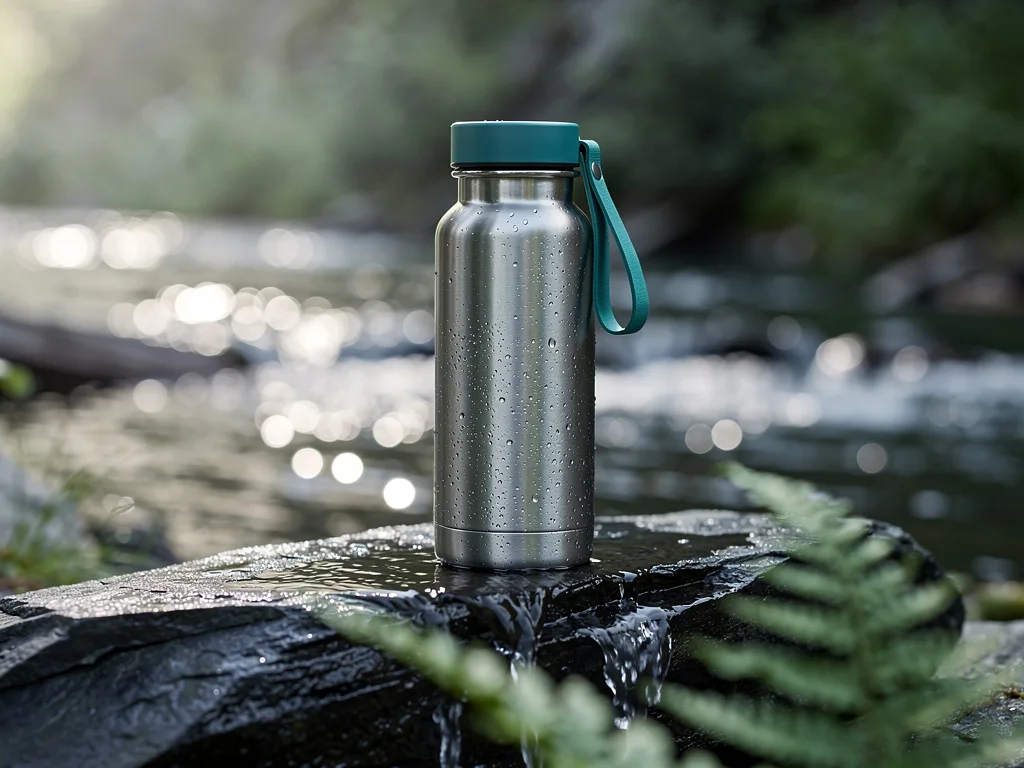
You don't write tool calls yourself. You tell your agent what you want, and it picks the tools. For this guide the request was: find a text-to-image model that costs at most one credit, and make a product photo of a steel water bottle with a teal strap on wet slate by a mountain stream.
The agent started by shopping within the budget:
{ "name": "list_models", "arguments": { "category": "text-to-image", "max_credits": 1, "compact": true } }117 models matched. Every entry carries the numbers an agent needs to choose; this is the one it picked:
{
  "model": "flux-2-pro",
  "category": "text-to-image",
  "cost_credits": 1,
  "price_basis": "default_request",
  "p50_seconds": 11.7,
  "success_rate": 1
}
cost_credits is what the call bills. p50_seconds and success_rate are measured from recent runs; a model that has not been measured simply has no such fields, which means unknown, not bad.
Then it ran the model:
{
  "name": "run",
  "arguments": {
    "model": "flux-2-pro",
    "params": {
      "image_size": "landscape_4_3",
      "prompt": "A product photo of a stainless steel insulated water bottle with a teal carry strap, standing on wet dark slate beside a small mountain stream. Early morning light from the left, fine water droplets on the brushed steel, shallow depth of field, a fern frond out of focus in the foreground. No text, no logos."
    }
  }
}
The answer comes back at once, before the image exists:
{
  "job_ref": "job_h4hB_1NRz3yWPz_e53ot1Q",
  "status": "pending",
  "cost_credits": 1,
  "message": "Generation queued, 1 credit(s) ($0.10) reserved; charged on completion, released if the run fails. Poll get_job with this job_ref until status is 'completed' or 'failed'."
}
The agent then checks get_job until the job is done:
{
  "job_ref": "job_h4hB_1NRz3yWPz_e53ot1Q",
  "model": "flux-2-pro",
  "status": "completed",
  "output_url": "https://photoproduct.io/api/public/mcp/job_h4hB_1NRz3yWPz_e53ot1Q/media_….jpg",
  "cost_credits": 1,
  "cost_usd": 0.1
}
Step 5: chain the result into the next call
Every parameter that takes a file also takes the job_ref of a completed job. To animate the photo above, the agent passes the reference instead of downloading the image and uploading it again. A call like this one would do it:
{
  "name": "run",
  "arguments": {
    "model": "minimax/h3/image-to-video",
    "params": {
      "image_url": "job_h4hB_1NRz3yWPz_e53ot1Q",
      "duration": 5,
      "prompt": "A slow push in on the bottle while the stream sparkles behind it."
    }
  }
}
File inputs also accept an upload reference from upload_from_url or upload_file, or the URL of a file that is already public. Models that are billed by the length of their input, such as transcription, need an upload reference, so the input can be measured before the job starts.
How far chaining goes is shown in the recorded workflow: one face, five calls, ending in a video where the same woman holds a product and talks about it.
What a run costs, and what happens when one fails
- Every call is quoted before it runs. The quote scales with the parameters you pass, such as resolution, duration and length of text, and is billed in whole credits, rounded up. A cheap model still costs one credit.
- Some quotes are estimates, and say so.
list_modelslabels each one:default_requestprices the model's defaults,input_dependentdepends on a file that hasn't been measured yet, andduration_ceilingprices the longest output at default settings. - Credits are reserved when a run is submitted and charged only when it completes. A failed or rejected run releases its reservation, so it costs nothing and needs no refund.
- Retries are safe.
runaccepts anidempotency_key. Repeat a call with the same key and you get the original job back, not a second run and a second bill. - A token can't run away with your balance. It stops at its daily limit, and every token stops at your balance.
Where to go from here
- Have your agent call
prompt_guidebefore it makes characters, scenes or video. It returns the grammar each kind of job needs and the mistakes that grammar prevents. - Read the recorded workflow to see what five chained calls produce and what they cost.
- Browse the live catalog and its prices in the agent section of the homepage.